The AI Design Gap: Moving Beyond One-Way Generation
 Karol Podżerek
Night Mode


The Broken Promise of AI UI Generation
There are plenty of tools capable of generating code from designs or directly from prompts. In theory, this looks like a dream scenario. It drastically shortens the journey from design to frontend development. The handoff is quicker, the design is easier to implement, and everyone involved is happier. Right?
Well, not exactly.
There are still glaring issues with this approach. I am not talking about the need to connect generated code to business logic or even the occasional poor and inconsistent code/design quality. I am talking about the fundamental disconnect between the design and the code layer.
The "Import" Trap
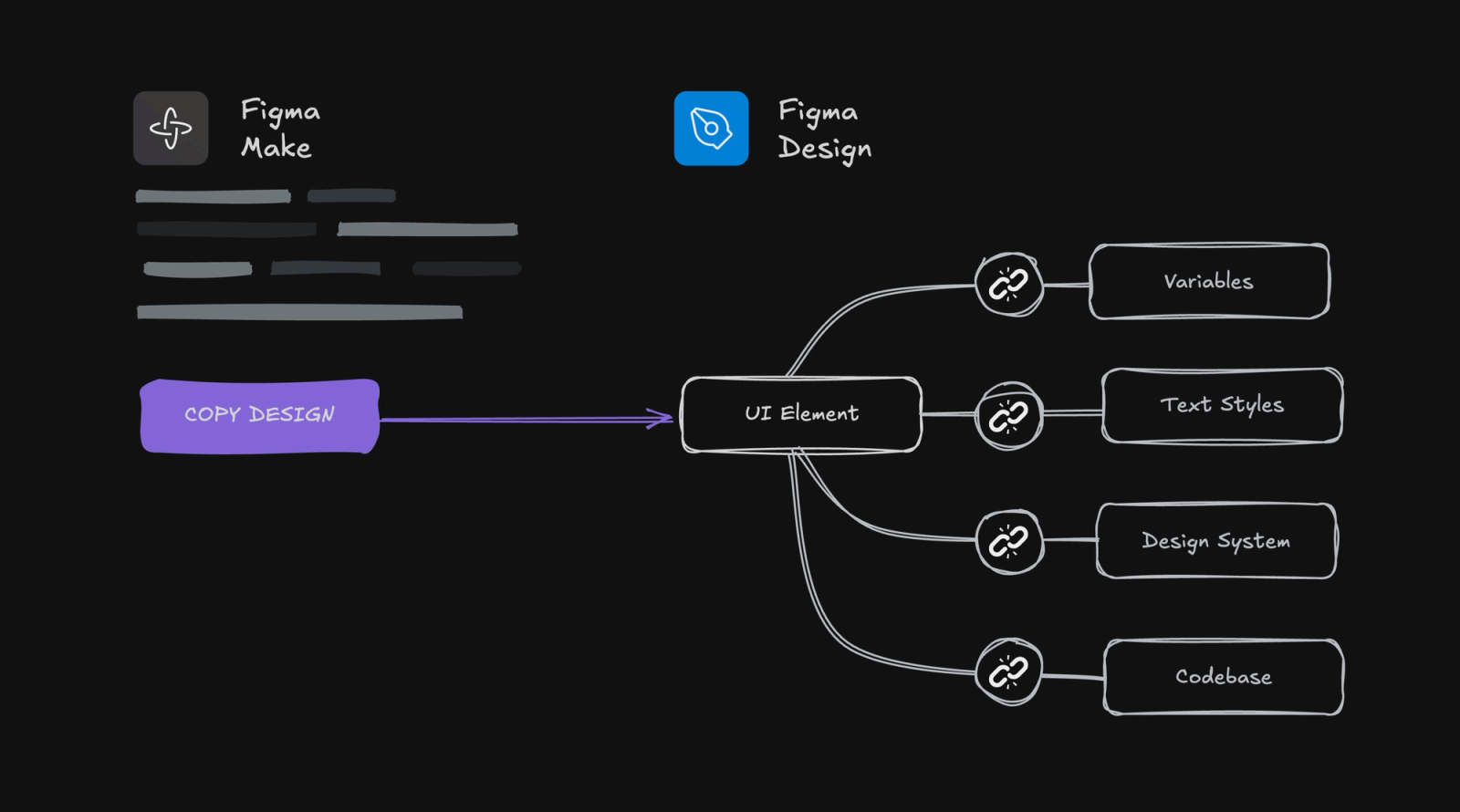
Once you generate the code, you can either open it in a browser or your favorite IDE. Some tools offer an import to Figma option, but this is often where the illusion breaks. The moment that design lands back on your canvas, the intelligence dies.
There is no easy way to generate robust Figma components or styles back from code. Usually, imported designs are just a graveyard of flat layers without components, variables, or text styles. Sure, it is better than a static screenshot. But if you want to iterate on that design using AI again, you are forced to rely on "AI vision" rather than a tightly connected design system.
Developers Have Cursor. What Do We Have?
It feels like almost every UI generation tool is built without the designer's actual workflow in mind.
Developers, for example, have access to Cursor, Windsurf, and other AI-assisted IDEs. They can generate code, manually fix it when the AI gets it wrong, and then let the AI continue working with full context of those manual changes. It is a fluid, bi-directional loop.
This workflow is currently missing for designers. Tools like Figma Make are trying to close this gap. For example it allows you to attach Figma library to prompt. This is a great step, but it assumes you already have a pristine, well-defined design system in Figma. It also remains a separate process, in separate window where you cannot easily maintain an iterative loop with AI directly on your designs.
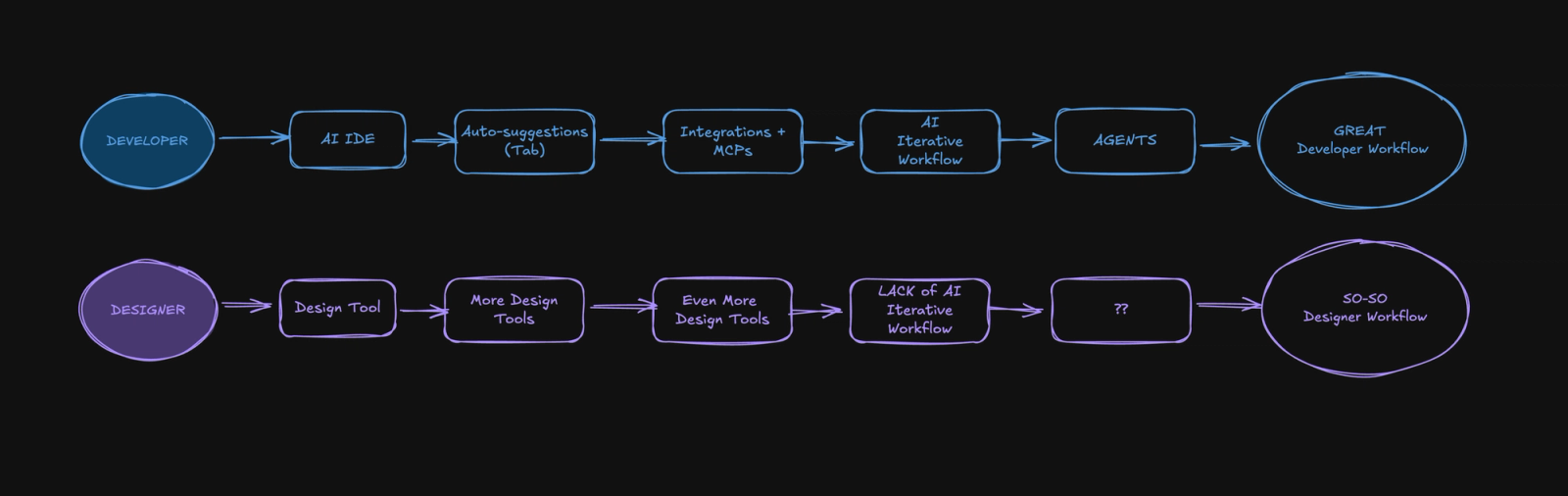
Looking at the image above, I believe the meme should be reversed. It depicts a designer sipping coffee while moving a logo 3px to the right, and a developer sweating over tricky integrations. Designers also juggle many tasks and developers have great tooling nowadays.
When AI Picks Your Tech Stack
Then there is the issue of the "AI Monoculture." Tools like Lovable overwhelmingly default to React (JSX) and Shadcn for styling.
What if you want to use Base UI, Bits UI, or mobile app with SwiftUI, or a completely custom internal library? You are fighting an uphill battle. These tools are optimized to generate Shadcn-style code, making it difficult to get output that matches other architectural patterns or design languages. If you are building with Svelte, Vue, or simply want a different styling foundation, you are largely out of luck. You either accept that your AI prototypes won't match your production environment, or you fight the tool to force a different output.
The Missing Link: Bi-Directional Sync
The iterative AI workflow problem runs even deeper. Even if we solve the "working with AI on the canvas" challenge, we still face a fundamental architectural issue: code and design exist as separate, disconnected layers.
We need to flip the script. Instead of the typical "design-to-code" waterfall, imagine a workflow where code and design are constantly in sync.
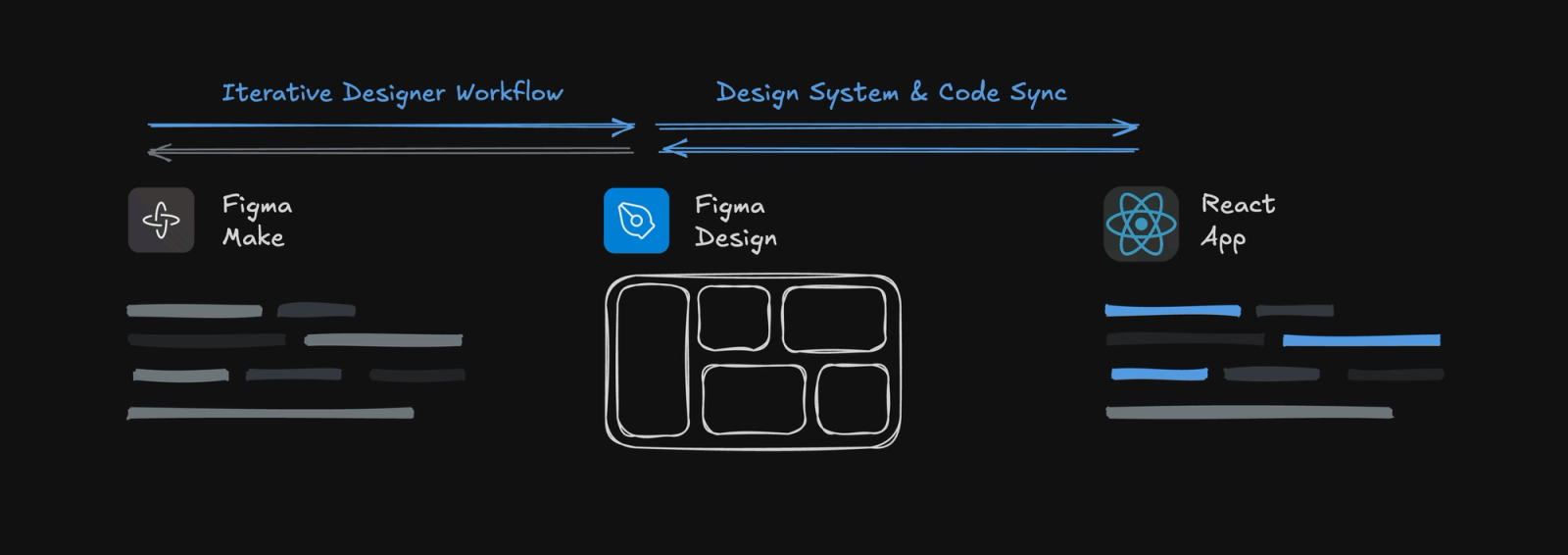
Here is why this matters: A designer explores card layouts in Figma Make, the team picks one, designer creates a consistent component and it propagates to the codebase automatically. Later, an engineer fixes an accessibility issue in the code. The Figma library updates instantly. When a PM prototypes a new feature, they know what they design is exactly what will ship. No Slack messages asking "is this the latest version?" No drift between what is designed and what is built.
This is not about skipping Figma or design step. It is about making design and code two views of the same system. Figma is for exploration and communication. Code is for logic and production. When they stay in sync, teams move faster and ship more consistently.
Bridging the Gap Without Waiting for AI
Before AI gets good enough to make us all obsolete (any day now, right?), we can start narrowing this gap ourselves. Here are a few practical steps we can take today to bring the design and code layers closer together.
Be Mindful of Frontend Libraries
As a designer, it is worth being aware of the frontend libraries your engineering team is using. Not every project needs a completely custom design system with bespoke naming conventions. There are plenty of well-documented, battle-tested libraries like Base UI, Bits UI, MUI and many others that allow teams to bootstrap projects quickly while still offering deep customization.
These libraries have already solved for component properties, accessibility, theming, and functional states. If you follow their conventions when crafting your design system, the design layer will naturally align much closer to the code layer from day one.
Scaffold Using Well-Known Primitives
Start your design system with universally understood primitives: colors, spacing scales, breakpoints, and typographic hierarchies. If you are not familiar with any established system, TailwindCSS is an excellent starting point.
There are many opinions about Tailwind, but the design decisions behind it are incredibly well thought out. You can see its influence everywhere, from libraries like Shadcn to the default output of AI code generators. Building on top of these conventions ensures your design system is immediately legible to both developers and AI tools.
Design Components That Mirror Code Structure
If you are not deeply familiar with frontend development, collaborate with your engineering team early. Ask questions about how components are structured in code. How does the component API expose customization – through props, slots, or composition? How are edge cases handled, like empty states or loading indicators? What accessibility patterns does the library enforce by default? What's the strategy for deprecating old patterns while maintaining backward compatibility?
What I Would Like to See in the Near Future
While we can do a lot manually today, there are still clear opportunities for tooling to evolve. Here is what I hope to see soon:
- AI-powered design token and component generation – Tools like Figma Make (or Figma itself) should allow us to generate design tokens and proper components with properties and variants from prompt. If you think about it code documentation is the best prompt for bootstrapping design system. The code is both semantic and pragmatic, leaving no room for bad interpretation.
- Bi-directional AI workflows in Figma – Just like developers can work iteratively with AI in Cursor, designers should be able to refine designs with AI directly on the canvas while keeping the full context of their changes.
- Prompt-based property updates – Imagine being able to say, "Add a disabled state to all buttons" or "Update spacing tokens to match our new grid system," and having the AI intelligently apply those changes across your entire library. That is the kind of workflow that many designers dream of.
- True bi-directional sync between codebase and Figma – Link code components directly to their Figma counterparts so that changes in one automatically reflect in the other. I know some teams have built internal solutions for this, and tools like Code Connect are moving in the right direction. But we need a clearer, more standardized approach that works out of the box, not just for enterprise teams with dedicated infrastructure.
The best outcome is not AI replacing us. It is AI making us more effective. Right now, most tools are optimized for generating output from scratch, which works well for proof of concepts but fails at scale. The real breakthrough will come when these tools start amplifying the work of people who already understand systems, patterns, and constraints. That is when we will move beyond impressive demos and start seeing well-architected, large-scale applications shipped faster than ever before.
Explore More Blog Posts
What is an agentic AI system for e-commerce?
An agentic AI system for e-commerce is software that autonomously plans and executes multi-step tasks across your commerce stack - from product discovery to order processing - without step-by-step human instruction. It uses large language models (LLMs) to reason, decide, and act on your behalf, grounded in your own product data.
 Kasia Ryniak
Field notes from HIMSS Europe 2026 in Copenhagen
My smartwatch knows more about my body on an average Tuesday than my hospital does. It tracks how I slept, how hard my heart worked on a run, whether I am trending in the wrong direction before I feel anything at all. The institution with the doctors, the scanners and a century of clinical knowledge mostly meets me when something has already gone wrong.
 Daniel Hekman
How AI is Replacing Us (and Reinventing) the Way We Work as a Software Consultancy
Earlier this year, I got a message. “You have to check out Claude. Look what I’ve been able to do in a couple of hours”. What followed was a link to something that, frankly, should have taken a few days to put together.
 Rafal Cymerys