Using Spree Automation Interfaces for automated translations
 Rafał Cymerys
Night Mode

One of the main goals of Spree 4.6, was allowing its users to scale globally. A common challenge in global expansion is providing localized content for multiple languages. While Spree's data model supports product catalogue translations out of the box, there's still a great amount of work required to prepare the actual translations. For a long time, a common approach was to coordinate the process with translation agencies and use mechanisms of import-export to mvoe the translations data around. This has however changed in the recent years, by the improvements in automated translation tools. We're seeing more and more companies taking a more efficient approach of automatically translating their content, and using a translator to proofread and correct the automated translations.
As a part of supporting Spree users, we've recently published a package called Spree Automation Interfaces that makes it easier to implement such automatons on top of Spree.
In this blog post, we will show how to use it to enable automated translations with DeepL.
Multi-language Store Setup
(You can skip this step if your store setup already enabled additional multiple locales).
First, let's go to the Spree admin panel and select Settings -> Store in the sidebar to the left.
In the screen below
You will see a list of "Supported Locales". For the purpose of this guide, we'll add set up additional locales: French and German.
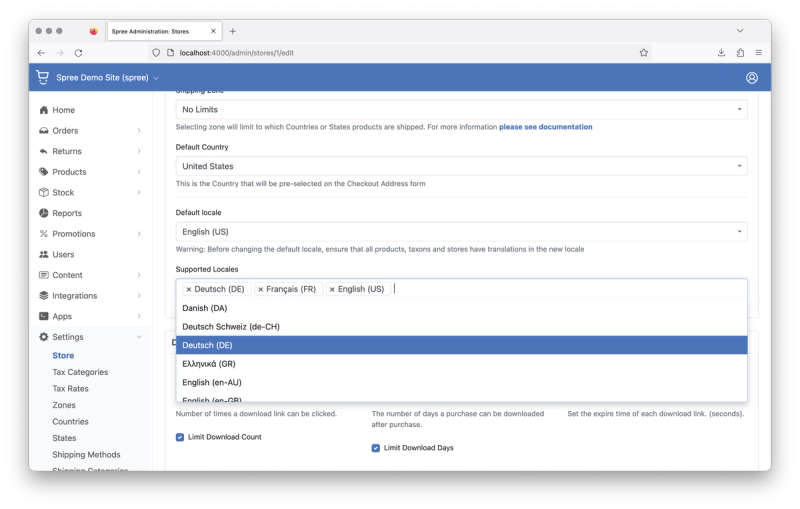
After that, press "Update" at the bottom to save the configuration.
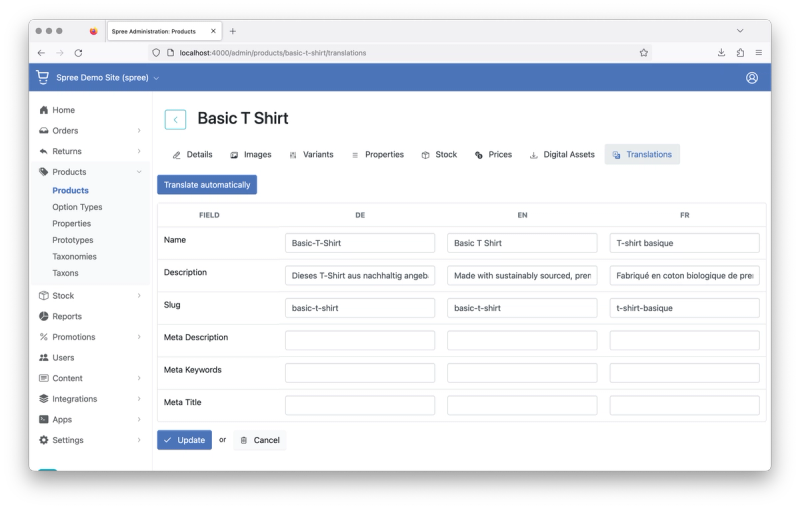
To confirm that the setup works correctly, navigate to a product in the admin panel, and go to its "Translations" tab. You should see a table for filling additional translations - this means that the setup is correct.
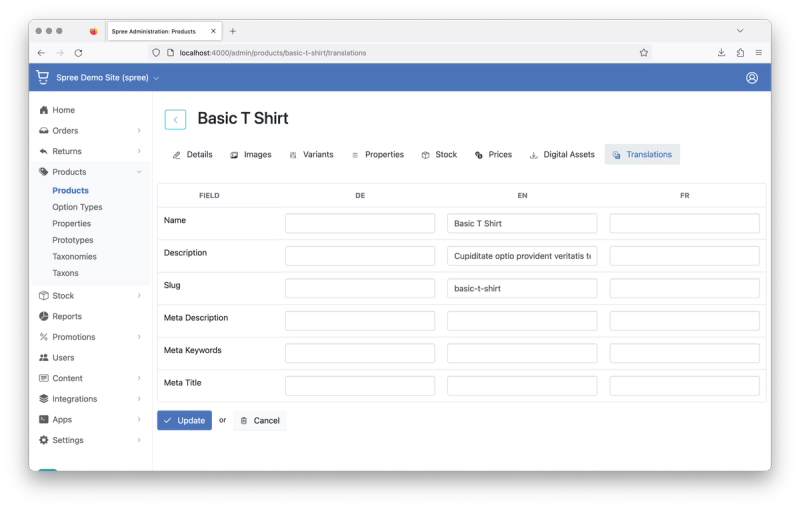
At this point, you can provide the translations manually. It's time to automate the process.
Add Spree Automation Interfaces and DeepL gems to your Gemfile
We need to add the following gems:
- spree_automation_interfaces - that brings the capability of automated translations into Spree
- deface - to allow spree_automation_interfaces to add new features to the admin panel
- deepl-rb - which we will use as a translations provider
gem 'spree_automation_interfaces', github: 'spree-contrib/spree_automation_interfaces'
gem 'deface'
gem 'deepl-rb', require: 'deepl'
After that run:
bundle installAnd restart your development server.
Translations Provider Implementation
Now, we need to provide an implementation for the Automation Interfaces, that will be called by Spree when the user requests translations to be created.
The required interface is defined as follows:
module Spree
  module Products
    module Translations
      interface _AutomatedTranslationsProvider
        def call: (source_attributes: Hash[String, String], source_locale: String, target_locale: String) -> Hash[Symbol | String, String]
      end
    end
  end
end
Let's create an implementation in app/services/spree/translations/deepl_translations_provider.rb
module Spree
  module Translations
    class DeeplTranslationsProvider
      def call(source_attributes:, source_locale:, target_locale:)
        name = source_attributes['name']
        description = source_attributes['description']
        translated_name, translated_description = DeepL.translate([name, description], nil, target_locale)
        {
          'name' => translated_name,
          'description' => translated_description
        }
      end
    end
  end
end
We also need to initialize DeepL's client. Let's create the following initializer config/initalizers/deepl.rb
DeepL.configure do |config|
  config.host = ENV.fetch('DEEPL_HOST', 'https://api-free.deepl.com') # Set api.deepl.com for production API
  config.auth_key = ENV.fetch('DEEPL_API_KEY')
end
Enabling Automated Translations Provider
Finally, configure Spree to use the provider we've just created
In config/initializers/spree_automation_interfaces.rb
Rails.application.config.after_initialize do
  SpreeAutomationInterfaces::Dependencies.products_automated_translations_provider = 'Spree::Translations::DeeplTranslationsProvider'
end
If you now go to the products translations page, you will see a "Translate automatically" button at the top.
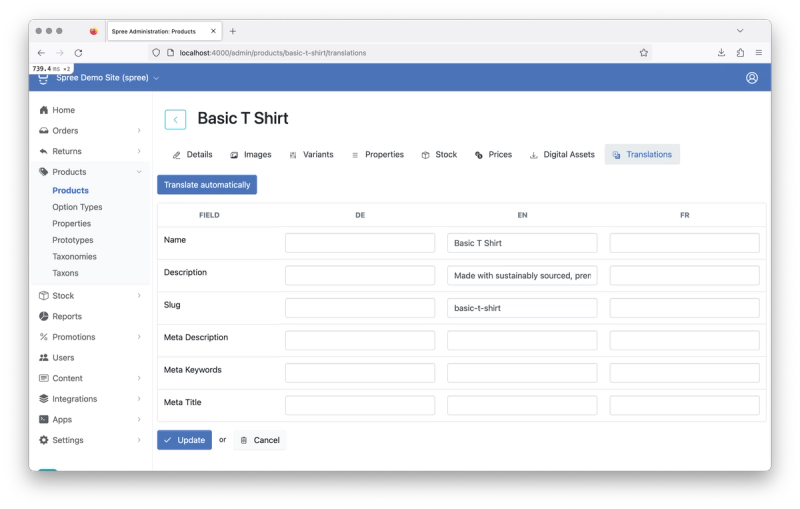
Once you click it, it will fetch translations using the provider we've just implemented and add them to the product.
Wrapping Up
This is just a sample use case of the automation interfaces. The gem also provides a set of APIs for triggering automated translations, as well as additional interfaces for triggering automated translations from the code. This may be a good starting point if you'd like to e.g. write a custom Sidekiq worker that will translate all the products in your catalogue.
Explore More Blog Posts

The AI Design Gap: Moving Beyond One-Way Generation
There are plenty of tools capable of generating code from designs or directly from prompts. In theory, this looks like a dream scenario. It drastically shortens the journey from design to frontend development. The handoff is quicker, the design is easier to implement, and everyone involved is happier. Right?
 Karol Podżerek
How to Integrate Enthusiast to Medusa's E-commerce Backend: A Complete Guide
If your team runs an e-commerce store on Medusa, you already have a strong foundation — modular architecture, flexibility, and full control over your product data.
 David Herbert
Migrating an ERP-Driven Storefront to Solidus Using a Message-Broker Architecture
Modern e-commerce platforms increasingly rely on modular, API-driven components. ERPs… do not. They are deterministic, slow-moving systems built around the idea that consistency matters more than speed.
 Mateusz Porębski